What is the Project Information and Attributes Feature? #
Projectmates can be configured to track important project information, including Project Address, Project Manager, Fiscal Year Start, Type, Prototype, and more. The Projectmates site administrator can configure the desired fields with a name and specify whether the field is a text box, drop-down, date, currency field, and more. This gives you the ability to really track the important data with the project and report on these key attributes.
Navigating and Updating Project Information Attributes #
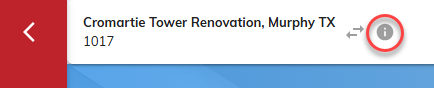
To access Project Information/Attributes, from inside the project. Click the “I” icon to the right of the project name in the upper left corner of the screen.
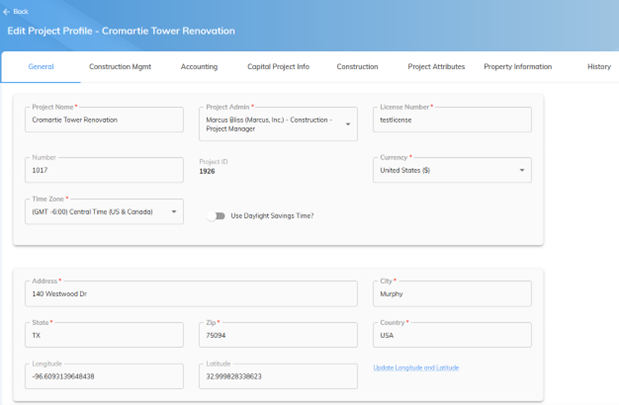
The Project Information/Attributes area is broken down by multiple tabs for ease of viewing. The names of these tabs may be different based on the Projectmates customer you are accessing. Click on each of the tabs to see the Project Attributes in those tabs.
a. General Tab
b. Accounting Tab
c. Construction Management Tab
To update project information or attributes, simply click in one of the cells and update the desired information. Click save in the upper right corner to save the changes.
Please note: You will need appropriate access rights to edit information. Users without edit access rights will only have read only access to the project attributes.
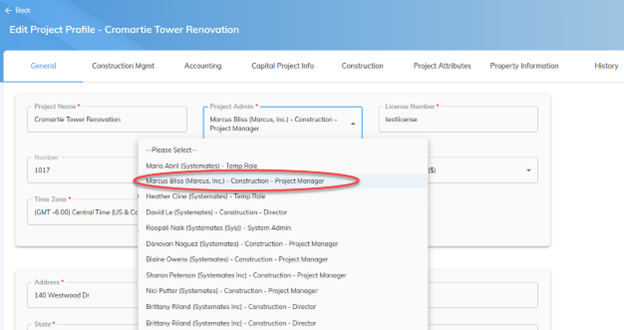
As a site administrator or primary Admin, to change the primary project administrator from the project information/attributes screen, select the new Project Admin from the drop-down list of available users.
Click the save button in the upper right corner to update the changes.